Thursday, September 24, 2009

Activity 19 - Restoration of Blurred Image

This last activity is about demonstration of restoration of a corrupted grayscale image with a known degradation function which in this case is motion blur and additive noise using Weiner filtering.

The following schematic diagram is a model of the image degradation and restoration process.


From the diagram, f_hat(x, y) is the approximate original image after the degraded image passes through one or more restoration filters, then the degraded image in the spatial domain can then be written in an equation as follows.


Here, h(x, y) represents the degradation function, f(x, y) is the original image and n(x, y) embodies the added noise. Meanwhile, its frequency representation in Fourier space is shown below.


The transfer function of image degradation implemented here is the following.


The variable T corresponds to the duration of exposure while a and b are the blurring displacements in the horizontal or x and vertical or y direction respectively.
In restoring the original image, the estimate image f_hat and the corrupted image f must have minimum mean square error between them. This condition is satisfied through the expression as follows called the minimum mean square error filter or the Weiner filter.
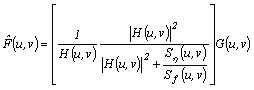


Note that the power spectrum of the noise and the original image are included in the Weiner filter which are shown below.


The power spectrum is similar to the modulus of the degradation transfer function as in the following equation.


As usual the first factor in the right hand side of the expression above denotes the complex conjugate of H(u, v).
In most cases, the power spectrum of the noise and undergraded image are not known, hence the Weiner filter can be approximated in the expression as follows.


Instead of the power spectra, it is replaced by K which is a constant that can be varied.

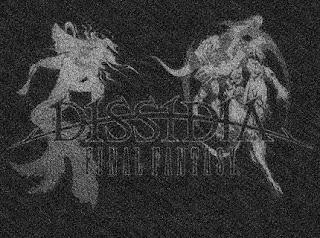
At first, the following grayscale image is obtained from the internet.


Source: http://tvtropes.org/pmwiki/pmwiki.php/Main/Ptitlefjcz80qe

A Gaussian noise with mean and standard deviation of 0.02 is then applied to the image. Next, the degradation transfer function parameters a, b, and T are varied resulting to the set of images as shown below (Arranged from top to bottom, left to right).

For T = 1: (1) a = 0.1, b = 0.1; (2) a = 0.01, b = 0.01; (3) a = 0.001, b = 0.001


For a = 0.01, b = 0.01: (1) T = 0.01; (2) T = 0.1; (3) T = 10; (4) T = 100


For constant exposure time, it can be observed that the degraded image becomes more discernible as the blurring displacements a and b decrease. Meanwhile, for constant blurring displacements, the added Gaussian noise is masked by the blurred image as the exposure time T increases.
Shown as follows are the restored images using Weiner filtering with the spectrum of the noise and undergraded image for different degradation transfer function parameters (Arranged from top to bottom, left to right).

For T = 1: (1) a = 0.1, b = 0.1; (2) a = 0.01, b = 0.01; (3) a = 0.001, b = 0.001


For a = 0.01, b = 0.01: (1) T = 0.01; (2) T = 0.1; (3) T = 10; (4) T = 100


Apparently, the restoration approaches the original image as the blurring displacements decrease as well as the exposure time increases.
The following last set of images is composed of restored images using Weiner filter with varying K values (Arranged from top to bottom, left to right).

For a = 0.01, b = 0.01, T = 1: (1) K = 0; (2) K = 0.000001; (3) K = 0.00001; (4) K = 0.0001; (5) K = 0.001; (6) K = 0.01; (7) K = 0.1; (8) K = 1



It can be noticed that since a constant, which is based from the ratio of the power spectrum of the noise to the undergraded image, is added in all the elements of the matrix in the process Weiner filtering, the added Gaussian noise is eliminated at the same time magnifying the blurring effect as K increases.
Weiner filtering with the power spectrum of the noise and the undergraded image is then recommended to be used when the power spectrum of the added noise and the undergraded image is known and also with minimal degradation while Weiner filtering with the constant K is more applicable for various corrupted image even without the power spectra as long as K is carefully chosen.

Since I am able to demonstrate a corrupted image with motion blur and additive noise, and restore it using Weiner filtering successfully, I grade myself 10/10.

I have worked individually in this activity however I have shared my insights to my classmates.

Appendix
The Scilab code below is utilized in this activity.

stacksize(4e7);

image = gray_imread('dissidia.jpg');
//scf(0);
//imshow(image, []);
//imwrite(normal(image), 'bwdissidia.bmp');

s = size(image);

noise_gauss = grand(s(1), s(2), 'nor', 0.02, 0.02);
noisy_image = image + noise_gauss;

N = fft2(noise_gauss);
F = fft2(image);

a = 0.01;
b = 0.01;
T = 1;

H = [];
for i = 1:s(1)
for j = 1:s(2)
H(i, j) = (T/(%pi*(i*a + j*b)))*(sin(%pi*(i*a + j*b)))*exp(-%i*%pi*(i*a + j*b));
end
end

G = H.*F + N;
noisy_blurred = abs(ifft(G));

//scf(1);
//imshow(noisy_blurred, []);
//imwrite(normal(noisy_blurred), 'noisy blurred_a001_b001_T1.bmp');

SN = N.*conj(N);
SF = F.*conj(F);
restore1 = (((1)./H).*((H.*conj(H))./((H.*conj(H)) + (SN./SF)))).*G;
restore1 = abs(ifft(restore1));

//scf(2);
//imshow(restore1, []);
//imwrite(normal(restore1), 'restore_a001_b001_T1.bmp');

K = 0.01;
restore2 = (((1)./H).*((H.*conj(H))./((H.*conj(H)) + K))).*G;
restore2 = abs(ifft(restore2));

//scf(3);
//imshow(restore2, []);
//imwrite(normal(restore2), 'restoreK001.bmp');

Tuesday, September 15, 2009

Activity 18 - Noise Models and Basic Image Restoration

In this activity, various noise models are applied in grayscale images, then different basic image restoration techniques are tested in recovering the original images.

Like in a grayscale image, noise is characterized by a probability distribution function (PDF). However, its PDF consists of random variables with parameters such as mean and standard deviation that may be altered.
The following are the most common noise models encountered in image processing. First below is the PDF of Gaussian noise which obviously follows a Gaussian curve with mu as its mean and sigma as its standard deviation.


The random variable z represents the grayscale value in the noise.
The PDF of Rayleigh noise is given as follows.


Its mean and variance are the following.


Next below is the PDF of Erlang or Gamma noise.


Whereas its mean and variance are shown as follows.


PDF of exponential noise is described by the following equations.


Its mean and variance are shown below.


Uniform noise has the following PDF.


Then its mean and variance are as follows.


Lastly, impulse or better known as salt-and-pepper noise is considered here. This has PDF expressed below.


Meanwhile, there are four basic image restoration techniques implemented in this activity. These are spatial filters which reduce added noise in the image.
Arithmetic mean filter operates through the following equation.


S_xy is a set of coordinates within a chosen rectangular sub-image window with size m x n in the noisy image centered at (x, y). Hence, it filters the noise by averaging the grayscale value at (x, y).
A noisy image under geometric mean filtering works with the equation as follows.


The harmonic mean filter which is shown below works well for salt noise or noisy pixels with grayscale values close to white but not with pepper noise or noisy pixels with grayscale values near to black.


Lastly, contraharmonic mean filter has expression given by the following.


The variable Q is called the order of the filter which may be positive that is good for pepper noise or negative that eliminates salt noise. Hence, it cannot remove both noise simultaneously.

Initially, a grayscale image as follows is created from Paint which only consists of three grayscale values.


Its PDF with grayscale values ranging from 0 to 255 is plotted in the following figure.


Apparently, the three peaks correspond to the three grayscale values of the image. Then, using the built-in function grand of Scilab, majority of the noise models are generated with the same size as the image (150 x 150). The image degradation is then simulated by simply adding the generated noise to the test image. Note that the parameters such as mean and standard deviation of the noise models in grand are carefully set to prevent the merging of the three grayscale levels in the original or test image and so the noisy image is still recognizable.
After adding Gaussian noise with mean 0.5 and standard deviation of 0.075 to the image, the image and its PDF becomes the following.


As can be observed, the Gaussian profiles have maximum near the three grayscale values implying that the noisy image is still discernable. The next set of figures are the filtered images using the arithmetic, geometric, harmonic, and contraharmonic mean filter arranged from left to right, top to bottom.


The sub-image window used for all the filters has size 3 x 3. However, the algorithm does not apply at the corners and edges of the noisy image, thus necessary boundary conditions are considered at these locations. For the contraharmonic mean filter, Q is equal to 1. It can be observed that the arithmetic and the contraharmonic mean filters are better compared in the geometric and harmonic mean filter for the added Gaussian noise.
Next, the Rayleigh noise is generated by first downloading a module called modnum. Rayleigh noise generator can then be used when the loader file of the module is loaded. The function genrayl in the module is then used with noise generator parameter set to 0.1. The resulting noisy image and its PDF after adding the Rayleigh noise are shown below.


The filtered images are as follows.


In this type of noise, all filters work well in restoring the test image.
Gamma noise is then added to the test image again using grand. Its parameters shape and scale are set to 1 and 10 respectively. The following are the resulting noisy image and its PDF.


The figures with Gamma noise after using the four filters are shown below.


The contraharmonic mean filter somehow fails in restoring the test image for the Gamma noise while the harmonic mean filter is the best filter for this case.
The test image with added exponential noise and its PDF are as follows. The mean of the exponential noise is set to 0.1.


Notice that the PDF is similar when Gamma noise is applied. The following set of figures is the result after using the four filters in the test image with Gamma noise.


And so the filtered images are similar to the added Gamma noise.
Again from grand, another noise model which is uniform noise is generated here where a uniform distribution is set from 0 to 0.2. Shown below are the noisy image and its PDF with this uniform noise.


The PDF indeed illustrate a uniform random grayscale values within the range of the three graylevels. Then, the restored noisy images with uniform noise through the four filters are as follows.


Noting that uniform noise is present, the four filters are effective in enhancing the noisy image.
The impulse or salt-and-pepper noise is simulated through the function imnoise where the noise density or probability of making salt or pepper noise is set to 0.01. The resulting noisy image and its PDF are the following.


The PDF is similar to the PDF of the test image without any noise because impulse noise only adds white (salt) or black (pepper) pixels while the test image is composed of only white, black, and gray pixels. Thus, what is only different in this PDF is the frequency of the three graylevels. Illustrated below are the filtered noisy image with impulse noise through the four filters.


It can be observed that the arithmetic mean filter is best in the test image with impulse noise. It is proven here that the harmonic mean filter eliminates salt noise but fails in pepper noise. Meanwhile, the contraharmonic mean filter with Q = 1 removes pepper noise but some salt noise still remain. Different Q values of the contraharmonic mean filter are also tested here. The filtered noisy image with Q equals to -1, 2, -2, and 0 arranged from left to right, top to bottom are as follows.


From the results above, positive Q values in the contraharmonic mean filter indeed eliminate pepper noise and not salt noise while negative Q values are truly good to salt noise but not to pepper noise. However, with Q equal to 0, both salt and pepper noise are minimized.

The whole process is also tested for a grayscale image which is not restricted to only three discrete grayscale values. The grayscale image of a beach obtained from the internet is shown below.


Source: http://www.advimglib.com/samples.html

The PDF of the image above is shown as follows.


Apparently, the PDF of this test image does not contain only three graylevels. The test image with Gaussian noise and its PDF are the following.


Below are the filtered test image with Gaussian noise using the four filters.


The test image with Rayleigh noise and its PDF are as follows.


The results of the filtered test image with Rayleigh noise through the four filters are the following.


Shown below are the test image with Gamma noise and its PDF.


The filtered test image with Gamma noise using the four filters are as follows.


Next are the test image with exponential noise and its PDF.


The following set of figures is the filtered test image with exponential noise.


Then, the test image with uniform noise and its PDF are shown below.


The filtered test image with uniform noise after applying the four filters are as follows.


Lastly, the following are the test image with impulse noise and its PDF.


Below are the filtered test image with impulse noise through the four filters.


The Q values of the contraharmonic mean filter are also varied to -1, 2, -2, and 0 resulting to the figures as follows.


Since the test image now has distribution of grayscale values, the four filters resulted to almost the same filtered image except in the test image with impulse noise unlike in the test image with only three grayscale values where a certain filter is preferred over the others. Overall, it can be deduced that the arithmetic mean filter is consistent in restoring both test image with three discrete graylevels and with distributed grayscale values to every type of noise added.

I grade myself 10/10 because I am able to simulate all the noise models introduced in this activity and I have successfully implemented the four basic image restoration techniques in the test images with different the noise models applied to them.

I thank Neil in providing me the test image with only three grayscale values.

Appendix
Below is the whole Scilab code utilized in this activity.

stacksize(4e7);

image = gray_imread('beach.jpg');
s = size(image);

//scf(0);
//imshow(image, []);

a = 1;
grayscale = [];
pixels = [];
for i = 0:255
[x, y] = find(round(255*normal(image)) == i);
grayscale(a) = i;
pixels(a) = length(x);
a = a + 1;
end

//scf(1);
//plot(grayscale, normal(pixels));
//title('PDF of Image without Noise');
//xlabel('Grayscale Values');

noise_gauss = grand(s(1), s(2), 'nor', 0.5, 0.075);
noise_ray = matrix(genrayl(0.1, s(1)*s(2)), s(1), s(2));
noise_gamma = grand(s(1), s(2), 'gam', 1, 10);
noise_exp = grand(s(1), s(2), 'exp', 0.1);
noise_uni = grand(s(1), s(2), 'unf', 0, 0.2);
noisy_image_salt = imnoise(image, 'salt & pepper', 0.01);

//noisy_image = round(255*normal(noisy_image_salt));
noisy_image = round(255*normal(image + noise_gauss));

//scf(2);
//imshow(noisy_image, []);
//imwrite(normal(noisy_image), 'image gauss noise.bmp');

a = 1;
grayscale = [];
pixels = [];
for i = 0:255
[x, y] = find(round(255*normal(noisy_image)) == i);
grayscale(a) = i;
pixels(a) = length(x);
a = a + 1;
end

//scf(3);
//plot(grayscale, normal(pixels));
//title('PDF of Image with Gaussian Noise');
//xlabel('Grayscale Values');

// Filtering Noisy Image

// Arithmetic Mean Filter

// Size of Rectangle Subimage Window (3 x 3)
m = 3;
n = 3;

for a = 1:s(1)
for b = 1:s(2)
if a == 1 & b == 1
g1 = [noisy_image(a, b) noisy_image(a, b + 1); noisy_image(a + 1, b) noisy_image(a + 1, b + 1)];
filtered1(a, b) = (1/(2*2))*sum(g1);
elseif a == 1 & b == s(2)
g1 = [noisy_image(a, b - 1) noisy_image(a, b); noisy_image(a + 1, b - 1) noisy_image(a + 1, b)];
filtered1(a, b) = (1/(2*2))*sum(g1);
elseif a == s(1) & b == 1
g1 = [noisy_image(a - 1, b) noisy_image(a - 1, b + 1); noisy_image(a, b) noisy_image(a, b + 1)];
filtered1(a, b) = (1/(2*2))*sum(g1);
elseif a == s(1) & b == s(2)
g1 = [noisy_image(a - 1, b - 1) noisy_image(a - 1, b); noisy_image(a, b - 1) noisy_image(a, b)];
filtered1(a, b) = (1/(2*2))*sum(g1);
elseif a == 1 & b ~= 1 & b ~= s(2)
g1 = [noisy_image(a, b - 1) noisy_image(a, b) noisy_image(a, b + 1); noisy_image(a + 1, b - 1) noisy_image(a + 1, b) noisy_image(a + 1, b + 1)];
filtered1(a, b) = (1/(2*3))*sum(g1);
elseif b == 1 & a ~= 1 & a ~= s(1)
g1 = [noisy_image(a - 1, b) noisy_image(a - 1, b + 1); noisy_image(a, b) noisy_image(a, b + 1); noisy_image(a + 1, b) noisy_image(a + 1, b + 1)];
filtered1(a, b) = (1/(3*2))*sum(g1);
elseif b == s(2) & a ~= 1 & a ~= s(1)
g1 = [noisy_image(a - 1, b - 1) noisy_image(a - 1, b); noisy_image(a, b - 1) noisy_image(a, b); noisy_image(a + 1, b - 1) noisy_image(a + 1, b)];
filtered1(a, b) = (1/(3*2))*sum(g1);
elseif a == s(1) & b ~= 1 & b ~= s(2)
g1 = [noisy_image(a - 1, b - 1) noisy_image(a - 1, b) noisy_image(a - 1, b + 1); noisy_image(a, b - 1) noisy_image(a, b) noisy_image(a, b + 1)];
filtered1(a, b) = (1/(2*3))*sum(g1);
else
g1 = [noisy_image(a - 1, b - 1) noisy_image(a - 1, b) noisy_image(a - 1, b + 1); noisy_image(a, b - 1) noisy_image(a, b) noisy_image(a, b + 1); noisy_image(a + 1, b - 1) noisy_image(a + 1, b) noisy_image(a + 1, b + 1)];
filtered1(a, b) = (1/(m*n))*sum(g1);
end
end
end

//scf(4);
//imshow(filtered1, []);
//imwrite(normal(filtered1), 'gauss filtered1.bmp');

// Geometric Mean Filter

for a = 1:s(1)
for b = 1:s(2)
if a == 1 & b == 1
g2 = [noisy_image(a, b) noisy_image(a, b + 1); noisy_image(a + 1, b) noisy_image(a + 1, b + 1)];
filtered2(a, b) = prod(g2)^(1/(2*2));
elseif a == 1 & b == s(2)
g2 = [noisy_image(a, b - 1) noisy_image(a, b); noisy_image(a + 1, b - 1) noisy_image(a + 1, b)];
filtered2(a, b) = prod(g2)^(1/(2*2));
elseif a == s(1) & b == 1
g2 = [noisy_image(a - 1, b) noisy_image(a - 1, b + 1); noisy_image(a, b) noisy_image(a, b + 1)];
filtered2(a, b) = prod(g2)^(1/(2*2));
elseif a == s(1) & b == s(2)
g2 = [noisy_image(a - 1, b - 1) noisy_image(a - 1, b); noisy_image(a, b - 1) noisy_image(a, b)];
filtered2(a, b) = prod(g2)^(1/(2*2));
elseif a == 1 & b ~= 1 & b ~= s(2)
g2 = [noisy_image(a, b - 1) noisy_image(a, b) noisy_image(a, b + 1); noisy_image(a + 1, b - 1) noisy_image(a + 1, b) noisy_image(a + 1, b + 1)];
filtered2(a, b) = prod(g2)^(1/(2*3));
elseif b == 1 & a ~= 1 & a ~= s(1)
g2 = [noisy_image(a - 1, b) noisy_image(a - 1, b + 1); noisy_image(a, b) noisy_image(a, b + 1); noisy_image(a + 1, b) noisy_image(a + 1, b + 1)];
filtered2(a, b) = prod(g2)^(1/(3*2));
elseif b == s(2) & a ~= 1 & a ~= s(1)
g2 = [noisy_image(a - 1, b - 1) noisy_image(a - 1, b); noisy_image(a, b - 1) noisy_image(a, b); noisy_image(a + 1, b - 1) noisy_image(a + 1, b)];
filtered2(a, b) = prod(g2)^(1/(3*2));
elseif a == s(1) & b ~= 1 & b ~= s(2)
g2 = [noisy_image(a - 1, b - 1) noisy_image(a - 1, b) noisy_image(a - 1, b + 1); noisy_image(a, b - 1) noisy_image(a, b) noisy_image(a, b + 1)];
filtered2(a, b) = prod(g2)^(1/(2*3));
else
g2 = [noisy_image(a - 1, b - 1) noisy_image(a - 1, b) noisy_image(a - 1, b + 1); noisy_image(a, b - 1) noisy_image(a, b) noisy_image(a, b + 1); noisy_image(a + 1, b - 1) noisy_image(a + 1, b) noisy_image(a + 1, b + 1)];
filtered2(a, b) = prod(g2)^(1/(m*n));
end
end
end

//scf(5);
//imshow(filtered2, []);
//imwrite(normal(filtered2), gauss filtered2.bmp');

// Harmonic Mean Filter

small_number = 0.000001;
for a = 1:s(1)
for b = 1:s(2)
if a == 1 & b == 1
g3 = [noisy_image(a, b) noisy_image(a, b + 1); noisy_image(a + 1, b) noisy_image(a + 1, b + 1)];
filtered3(a, b) = (2*2)/(sum((1)./(g3 + small_number)));
elseif a == 1 & b == s(2)
g3 = [noisy_image(a, b - 1) noisy_image(a, b); noisy_image(a + 1, b - 1) noisy_image(a + 1, b)];
filtered3(a, b) = (2*2)/(sum((1)./(g3 + small_number)));
elseif a == s(1) & b == 1
g3 = [noisy_image(a - 1, b) noisy_image(a - 1, b + 1); noisy_image(a, b) noisy_image(a, b + 1)];
filtered3(a, b) = (2*2)/(sum((1)./(g3 + small_number)));
elseif a == s(1) & b == s(2)
g3 = [noisy_image(a - 1, b - 1) noisy_image(a - 1, b); noisy_image(a, b - 1) noisy_image(a, b)];
filtered3(a, b) = (2*2)/(sum((1)./(g3 + small_number)));
elseif a == 1 & b ~= 1 & b ~= s(2)
g3 = [noisy_image(a, b - 1) noisy_image(a, b) noisy_image(a, b + 1); noisy_image(a + 1, b - 1) noisy_image(a + 1, b) noisy_image(a + 1, b + 1)];
filtered3(a, b) = (2*3)/(sum((1)./(g3 + small_number)));
elseif b == 1 & a ~= 1 & a ~= s(1)
g3 = [noisy_image(a - 1, b) noisy_image(a - 1, b + 1); noisy_image(a, b) noisy_image(a, b + 1); noisy_image(a + 1, b) noisy_image(a + 1, b + 1)];
filtered3(a, b) = (3*2)/(sum((1)./(g3 + small_number)));
elseif b == s(2) & a ~= 1 & a ~= s(1)
g3 = [noisy_image(a - 1, b - 1) noisy_image(a - 1, b); noisy_image(a, b - 1) noisy_image(a, b); noisy_image(a + 1, b - 1) noisy_image(a + 1, b)];
filtered3(a, b) = (3*2)/(sum((1)./(g3 + small_number)));
elseif a == s(1) & b ~= 1 & b ~= s(2)
g3 = [noisy_image(a - 1, b - 1) noisy_image(a - 1, b) noisy_image(a - 1, b + 1); noisy_image(a, b - 1) noisy_image(a, b) noisy_image(a, b + 1)];
filtered3(a, b) = (2*3)/(sum((1)./(g3 + small_number)));
else
g3 = [noisy_image(a - 1, b - 1) noisy_image(a - 1, b) noisy_image(a - 1, b + 1); noisy_image(a, b - 1) noisy_image(a, b) noisy_image(a, b + 1); noisy_image(a + 1, b - 1) noisy_image(a + 1, b) noisy_image(a + 1, b + 1)];
filtered3(a, b) = (m*n)/(sum((1)./(g3 + small_number)));
end
end
end

//scf(6);
//imshow(filtered3, []);
//imwrite(normal(filtered3), 'gauss filtered3.bmp');

// Contraharmonic Mean Filter

Q = 0;
for a = 1:s(1)
for b = 1:s(2)
if a == 1 & b == 1
g4 = [noisy_image(a, b) noisy_image(a, b + 1); noisy_image(a + 1, b) noisy_image(a + 1, b + 1)];
filtered4(a, b) = (sum((g4 + small_number).^(Q + 1)))/(sum((g4 + small_number).^Q));
elseif a == 1 & b == s(2)
g4 = [noisy_image(a, b - 1) noisy_image(a, b); noisy_image(a + 1, b - 1) noisy_image(a + 1, b)];
filtered4(a, b) = (sum((g4 + small_number).^(Q + 1)))/(sum((g4 + small_number).^Q));
elseif a == s(1) & b == 1
g4 = [noisy_image(a - 1, b) noisy_image(a - 1, b + 1); noisy_image(a, b) noisy_image(a, b + 1)];
filtered4(a, b) = (sum((g4 + small_number).^(Q + 1)))/(sum((g4 + small_number).^Q));
elseif a == s(1) & b == s(2)
g4 = [noisy_image(a - 1, b - 1) noisy_image(a - 1, b); noisy_image(a, b - 1) noisy_image(a, b)];
filtered4(a, b) = (sum((g4 + small_number).^(Q + 1)))/(sum((g4 + small_number).^Q));
elseif a == 1 & b ~= 1 & b ~= s(2)
g4 = [noisy_image(a, b - 1) noisy_image(a, b) noisy_image(a, b + 1); noisy_image(a + 1, b - 1) noisy_image(a + 1, b) noisy_image(a + 1, b + 1)];
filtered4(a, b) = (sum((g4 + small_number).^(Q + 1)))/(sum((g4 + small_number).^Q));
elseif b == 1 & a ~= 1 & a ~= s(1)
g4 = [noisy_image(a - 1, b) noisy_image(a - 1, b + 1); noisy_image(a, b) noisy_image(a, b + 1); noisy_image(a + 1, b) noisy_image(a + 1, b + 1)];
filtered4(a, b) = (sum((g4 + small_number).^(Q + 1)))/(sum((g4 + small_number).^Q));
elseif b == s(2) & a ~= 1 & a ~= s(1)
g4 = [noisy_image(a - 1, b - 1) noisy_image(a - 1, b); noisy_image(a, b - 1) noisy_image(a, b); noisy_image(a + 1, b - 1) noisy_image(a + 1, b)];
filtered4(a, b) = (sum((g4 + small_number).^(Q + 1)))/(sum((g4 + small_number).^Q));
elseif a == s(1) & b ~= 1 & b ~= s(2)
g4 = [noisy_image(a - 1, b - 1) noisy_image(a - 1, b) noisy_image(a - 1, b + 1); noisy_image(a, b - 1) noisy_image(a, b) noisy_image(a, b + 1)];
filtered4(a, b) = (sum((g4 + small_number).^(Q + 1)))/(sum((g4 + small_number).^Q));
else
g4 = [noisy_image(a - 1, b - 1) noisy_image(a - 1, b) noisy_image(a - 1, b + 1); noisy_image(a, b - 1) noisy_image(a, b) noisy_image(a, b + 1); noisy_image(a + 1, b - 1) noisy_image(a + 1, b) noisy_image(a + 1, b + 1)];
filtered4(a, b) = (sum((g4 + small_number).^(Q + 1)))/(sum((g4 + small_number).^Q));
end
end
end

//scf(7);
//imshow(filtered4, []);
//imwrite(normal(filtered4), 'gauss filtered4.bmp');

Tuesday, September 8, 2009

Activity 17 - Photometric Stereo

The shape of a surface is estimated and then plotted 3-dimensionally in this activity using photometric stereo.

In photometric stereo, the 3-dimensional form of an object can be determined through captured intensity profiles of that object. The intensity profile is varied through different locations of an illuminating source. A point source is considered here. The location of N point sources is defined in a matrix as follows.


A row represents a point source and each row corresponds to its x, y, and z component. Now, for N number of images of the object, the intensity at (x, y) on the surface is given by the following.


This can be written in a matrix operation shown below.


Note that g is a function of the reflectance of the surface multiplied to the normal vector at (x, y) as shown in the following equation.


Since g is initially unknown, this can be obtained using the matrix equation as follows.


Then, the normal vector of the surface is calculated through the expression below.


Note that the denominator from the equation above is the length of g computed employing Pythagorean theorem in 3-dimension. From the normal vector, the shape of the object can be determined in the following definition of its surface elevation at (x, y).


The expression above is then rewritten as follows.


The gradient of c(x, y, z) shown below is next obtained in order to relate the estimated surface normals n_x, n_y, and n_z using photometric stereo and the partial derivative of f.


Meanwhile, the relation between the surface normals and the partial derivative of f is the following.


Finally, the object's surface elevation at point (u, v) is evaluated through the line integral as follows.


A Matlab file containing four images of a surface is loaded in Scilab using the function loadmatfile. These images are shown below.


Each image above is illuminated by a point source located respectively at
V_1 = [0.085832, 0.17365, 0.98106]
V_2 = [0.085832, -0.17365, 0.98106]
V_3 = [0.17365, 0, 0.98481]
V_4 = [0.16318, -0.34202, 0.92542]

These four point source locations are then placed in matrix V with size 4 x 3 as well as the four intensity profiles in matrix I with size 4 x (128*128) or 4 x 16384. Note that each loaded intensity profile has size 128 x 128. The size of matrix g and surface normal n obtained is thus 3 x 16384. To prevent division by zero, a very small value 0.000001 is added to every element of the length or magnitude of g and to all elements of n_z. The calculated partial derivatives of f with respect to x and y are recasted into a matrix with size 128 x 128 for evaluation of the surface elevation at (u, v). The line integrals are operated using cumsum of Scilab where the limit of integration from 0 to u means the cumulative summation along the column (from 1st column to 128th column) of the partial derivative of f with respect to x. Conversely, the limit of integration from 0 to v is the cumulative summation along the row (from 1st row to 128th row) of the partial derivative of f with respect to y.
The following figure is then the plotted surface of the object in 3-dimension.


Apparently, the shape of the surface is successfully reconstructed 3-dimensionally. From the 3-D plot, it is revealed that the object is hemispherical with four divided quadrants as observed from the intensity profiles.

Since I am able to show the shape of the given surface successfully using photometric stereo, I grade myself 10/10.

I worked with Gary in completing this activity.

Appendix
The whole Scilab code utilized in this activity is as follows.

loadmatfile('Photos.mat');

//scf(0);
//imshow(I1, []);
//scf(1);
//imshow(I2, []);
//scf(2);
//imshow(I3, []);
//scf(3);
//imshow(I4, []);

I1 = matrix(I1, 1, size(I1, 1)*size(I1, 2));
I2 = matrix(I2, 1, size(I2, 1)*size(I2, 2));
I3 = matrix(I3, 1, size(I3, 1)*size(I3, 2));
I4 = matrix(I4, 1, size(I4, 1)*size(I4, 2));

I = [I1; I2; I3; I4];

V1 = [0.085832, 0.17365, 0.98106];
V2 = [0.085832, -0.17365, 0.98106];
V3 = [0.17365, 0, 0.98481];
V4 = [0.16318, -0.34202, 0.92542];
V = [V1; V2; V3; V4];

small_number = 0.000001;
g = inv(V'*V)*V'*I;
magnitude = sqrt((g(1,:).^2) + (g(2,:).^2) + (g(3,:).^2)) + small_number;

for i = 1:3
n(i,:) = g(i,:)./magnitude;
end

n_x = n(1,:);
n_y = n(2,:);
n_z = n(3,:) + small_number;
partial_f_to_x = -n_x./n_z;
partial_f_to_y = -n_y./n_z;
partial_f_to_x = matrix(partial_f_to_x, 128, 128);
partial_f_to_y = matrix(partial_f_to_y, 128, 128);
z = cumsum(partial_f_to_x, 2) + cumsum(partial_f_to_y, 1);

//scf(4);
//plot3d(1:128, 1:128, z);

Thursday, September 3, 2009

Activity 16 - Neural Networks

For the third time after Activity 14 and 15, grouping objects belonging to different classes is done in this acitvity. The artificial neural network (ANN) algorithm is implemented here to classify these sets of objects.

Again, the features of a sample which are the pixel area, normalized chromaticity values in red, green, and blue obtained from Activity 14 are used in this activity. This time, 3 classes from Activity 14 which are Snacku rice crackers, Superthin biscuits, and Nova multigrain snack with 10 samples each are accounted here unlike from Activity 15 which considers only 2 classes. These are shown below.


ANN recognizes patterns through learning by example. This is similar to how the human brain works in classifying objects. Once it has learned after some training cycles, ANN can quickly and accurately operate pattern processing.
The model of an artificial neuron which is the basic unit of ANN is illustrated as follows.


From the model above, the weighted inputs x_1, x_2, ..., x_i multiplied to their corresponding synaptic strengths or weights w_1, w_2, ..., w_i of a neuron are summed to produce a which then acts to the activation function g. Then, the output z is transmitted to other neurons as part of the ANN's learning period.
ANN has 3 layers namely the input layer, hidden layer, and the output layer. The input layer consists the features that are then transmitted to every neuron of the hidden layer noting that all neurons of the preceding layer are interconnected to every neurons of the succeeding layer. The results are then passed on to the output layer which determines the class to where the input features belong. The following is an illustration of a simple ANN.


Using the ANN_Toolbox_0.4.2 loaded in Scilab, built-in functions ann_FF_init, ann_FF_Std_online, and ann_FF_run are employed to simulate an ANN to classify 15 test samples. The first function ann_FF_init initializes the network which has l number of neurons in the input layer, m number of neurons in the hidden layer, and n number of neurons in the output layer. This then becomes the weight of ann_FF_Std_online training period. The features of the training set, their corresponding class matrix, the network, its learning rate, and the number of training cycles are other arguments of the second function. The argument learning rate is together with the threshold of the error tolerated by the network which is usually set to 0. The last built-in function ann_FF_run with weight as the result of the second function is finally applied to the features of the 15 test samples. This also has the argument of the network same in the first two functions. It returns the classes to where each sample belongs.
Note that the 30 samples are again divided into two where the first serves as the training set with 5 samples in each class for the ANN to learn and the second represents the test set to be classified, again with 5 samples in each class. The samples of the training set have class matrix [0, 0, 0, 0, 0, 0.5, 0.5, 0.5, 0.5, 0.5, 1, 1, 1, 1, 1] because it is observed that the built-in functions in the ANN toolbox of Scilab operate only between 0 and 1. However, the output classes are made to return rounded integer values of 0 for Snacku, 1 for Superthin, and 2 for Nova. Furthermore, it is ascertained that these functions cannot recognize features greater than 1. Since the pixel area feature is obviously greater than 1, it is normalized for the training and test samples. Meanwhile, the network used is composed of 4 neurons in the input layers where each neuron represents a feature, 8 neurons in the hidden layer which may be altered to multiples of 4, and 1 neuron in the output layer corresponding to the class assigned to a test sample.
The tables below are the summary of the test samples' classification where the training parameters are varied to observe the ANN's behavior (click the tables for larger view).


The first table above has 500 training cycles while the table below it has 1000 training cycles. Both are tested with learning rates of 1.0 and 5.0. The 15 test samples are classified correctly for all different training parameters used. Moreover, it can be observed that as the number of training cycles and the learning rate are increased, the outputs approach 0, 0.5 and 1 and thus approach 0 for Snacku, 1 for Superthin, and 2 for Nova.

The order of the test samples are also randomized to see if they are still to be grouped correctly. Here, 1000 training cycles and learning rate of 5.0 are employed. The results are summarized in the table as follows (click the table for larger view).


Apparently, all test samples are still grouped appropriately to their corresponding classes even these inputs are in different order. Thus, ANN's class recognition does not require inputs in arranged manner.

I grade myself 10/10 in this activity because I have successfully implemented ANN for class recognition and all test samples are grouped correctly.

Thanks to Miguel who sent a working version of the ANN toolbox for Scilab 4.1.2 for the whole class.

Appendix
The following Scilab code is utilized in this activity. This is based from the code of Mr. Cole Fabros in his blog (http://cole-ap186.blogspot.com) where it is mentioned that the code is originally made by Mr. Jeric Tugaff (Both are 2008 AP 186 students).

snacku_training = fscanfMat('snacku_training.txt');
superthin_training = fscanfMat('superthin_training.txt');
nova_training = fscanfMat('nova_training.txt');
snacku_test = fscanfMat('snacku_test.txt');
superthin_test = fscanfMat('superthin_test.txt');
nova_test = fscanfMat('nova_test.txt');

snacks_training = [snacku_training; superthin_training; nova_training];
snacks_training(:,1) = snacks_training(:,1)/max(snacks_training(:,1));
snacks_training = snacks_training';
snacks_test = [snacku_test; superthin_test; nova_test];
snacks_test(:,1) = snacks_test(:,1)/max(snacks_test(:,1));
snacks_test = snacks_test';

rand('seed', 0);

network = [4, 8, 1];
groupings = [0 0 0 0 0 0.5 0.5 0.5 0.5 0.5 1 1 1 1 1];
learning_rate = [5, 0];
training_cycle = 1000;

index = [1:15]';
random_index = grand(1, 'prm', index);

random_snacks = [];
for i = 1:length(index)
random_snacks(:,i) = snacks_test(:,random_index(i));
end

training_weight = ann_FF_init(network);
weight = ann_FF_Std_online(snacks_training, groupings, network, training_weight, learning_rate, training_cycle);
class = ann_FF_run(random_snacks, network, weight);

for j = 1:length(index)
if class(j) < 0.2
class(j) = class(j);
elseif 0.4 < class(j) & class(j) < 0.6
class(j) = 0.5 + class(j);
else
class(j) = 1.0 + class(j);
end
end

rclass = round(class);

Thursday, August 27, 2009

Activity 15 - Probabilistic Classification

This activity is similar to the previous one except that another method is implemented here. Objects are grouped here using probabilistic classification.

Instead of 3, only 2 classes are considered here which are all from Activity 14, Snacku rice crackers and Superthin biscuits. As assembled previously, 10 samples represent each class. These are shown below.


Also, the 4 features which are the sample's pixel area, normalized chromaticity values in red, green, and blue and their corresponding data from Activity 14 are used for probabilistic classification. Each class is again divided into a training set and a test set where each set contains 5 samples.
The probabilistic classification is rooted from the algorithm of linear discriminant analysis (LDA). From the following discriminant function, a test object k is assigned to class i that has maximum f_i.


Note that the transpose matrix operation is represented by T and -1 is the inverse matrix operation. The last term contains the prior probability of class i shown below.


From the equation above, n_i is the number of samples in class i and N is the total number of samples in the training set. Meanwhile, matrix C is called the pooled within class covariance matrix and this obtained from matrix c which is called the covariance matrix. These are as follows.


Note that there are g total number of classes. Covariance matrix is determined from the mean corrected data and the features of the training set which are represented by the following expressions from top to bottom respectively.


The global mean vector mu consists the average of each feature w_i,j,m coming from all classes of the training set and M is the total number of features. Going back to the discriminant function f_i, mu_i is composed of the mean of each feature just from class i in the training set. Thus, using LDA to classify an unknown or test sample, a training set is still required in order to establish the discriminant function which categorize the test sample with the same features possessed by the training set to a class.

The table below summarizes the data gathered from the training set (click the table for larger view).


Finally, the results of the LDA to the test set are summarized in the following table (click the table for larger view).


It can be observed that the values between the two discriminant functions are very small for all samples of the test set compared to the large deviations between the minimum distances acquired in Activity 14. The large values of discriminant function are because of the quantified feature pixel area which is relatively greater than the normalized chromaticity values. Nevertheless, all 10 samples of the test set are correctly grouped to their respective classes.

I grade myself 10/10 in this activity because I have implemented LDA properly and grouped all test samples to their expected classes.

I have successfully finished the activity individually. However, I have helped my classmates on how to handle this activity.

Appendix
The whole Scilab code below is utilized in this activity.

snacku_training = fscanfMat('snacku_training.txt');
superthin_training = fscanfMat('superthin_training.txt');
snacku_test = fscanfMat('snacku_test.txt');
superthin_test = fscanfMat('superthin_test.txt');

x_training = [snacku_training; superthin_training];
x_test = [snacku_test; superthin_test];

myu1 = [mean(snacku_training(:,1)), mean(snacku_training(:,2)), mean(snacku_training(:,3)), mean(snacku_training(:,4))];
myu2 = [mean(superthin_training(:,1)), mean(superthin_training(:,2)), mean(superthin_training(:,3)), mean(superthin_training(:,4))];

myu = [mean(x_training(:,1)), mean(x_training(:,2)), mean(x_training(:,3)), mean(x_training(:,4))];

x01 = [snacku_training(1,:) - myu; snacku_training(2,:) - myu; snacku_training(3,:) - myu; snacku_training(4,:) - myu; snacku_training(5,:) - myu];
x02 = [superthin_training(1,:) - myu; superthin_training(2,:) - myu; superthin_training(3,:) - myu; superthin_training(4,:) - myu; superthin_training(5,:) - myu];

n1 = 5;
n2 = 5;

c1 = (x01'*x01)/n1;
c2 = (x02'*x02)/n2;

for r = 1:4
for s = 1:4
C(r, s) = (n1/(n1 + n2))*(c1(r, s) + c2(r, s));
end
end

invC = inv(C);

P1 = n1/(n1 + n2);
P2 = n2/(n1 + n2);
P = [P1; P2];

for k = 1:(n1 + n2)
f1(k) = myu1*invC*x_test(k,:)' - (1/2)*myu1*invC*myu1' + log(P(1));
f2(k) = myu2*invC*x_test(k,:)' - (1/2)*myu2*invC*myu2' + log(P(2));
end

f = [f1, f2];
//fprintfMat('f_test.txt', f);

class = [];
for i = 1:(n1 + n2)
[a, b] = find(f(i,:) == max(f(i,:)));
class = [class; b];
end

Tuesday, August 25, 2009

Activity 14 - Pattern Recognition

The main objective of this activity is to classify various objects with different characteristics through pattern recognition.

In pattern recognition, the characteristics of an object belonging to a type or class are called features. These are quantified which may be the object's area, color, and many others. Pattern is then a set of features and a class is a set of patterns which share common features. The task is thus finding the features of an unknown object belonging to one of the several classes.

There are 3 classes assembled in this activity. They are all edible which include Snacku rice crackers, Superthin biscuits, and Nova multigrain snack. Each class is composed of 10 samples. The setup is shown below.


The 30 samples are grouped according to their respective classes for simplified image processing. Each class is divided into two, 5 samples serve as the training set and the other 5 correspond to the test set. Features that have been decided to use for pattern recognition are the sample's pixel area, average normalized chromaticity values in red, green, and blue for a total of 4.
The pixel area is attained by binarizing and inverting the cropped image of a class using the most appropriate predetermined threshold value. The funciton bwlabel of Scilab is then implemented to sum up the white pixels of each cluster equivalent to the pixel area of a sample and this is similar to the algorithm in Activity 9.
Meanwhile, parametric segmentation in Activity 12 is employed to get the normalized chromaticity values in red, green, and blue of each sample. This is operated through cropped individual sample images of each class. Note that the normalized chromaticity values in red, green, and blue are ensured that these just came from the samples (not with the background) by extracting the pixel coordinates of the segmented images.
Next, quantified features are ordered into a matrix called feature vector. Hence, in this case, a sample's feature vector consists 4 elements. Mean feature vectors representing each class are then obtained using the following equation.


Here, N_j is the total number number of samples in a class w_j which is here, equal to 5 while the 1 x 4 matrix x_j is composed of all 4 feature vectors acquired from image processing and then this is summed for N_j samples. Through minimum distance classification stated by the following expression, the features of each sample in the test set is then compared to the matrix of mean features m_j in the training set.


From the expressions above, x is the feature vector of a test sample, W is the total number of class and T is the transpose matrix operation. The class index j of the minimum distance D_j(x) is then assigned to the Nth sample from the test set of a class.

The results from the training set are shown in the table below (click the table for larger view).


Finally, the resulting classification of the test set is summarized in the following table (click the table for larger view).


It can be observed that the calculated distance D_j(x) is relatively large when a test sample does not match the expected class. Notice that the distances are big numbers because recall that the quantified feature pixel area is relatively larger than the normalized chromaticity values. But most importantly, all 15 samples in the test set are classified correctly.

Since I have understood the process of pattern recognition using the minimum distance classification and at the same time, successfully classifying all the samples in the test set, I grade myself 10/10 in this activity.

I have successfully completed this activity through discussions with Gary.

Appendix
The whole Scilab code below is utilized in this activity.

stacksize(4e7);

//snacku = gray_imread('snacku.jpg');

//scf(0);
//imshow(snacku);
//imwrite(snacku, 'gray snacku.bmp');

snack_A = [];
for a = 1:3
snack = gray_imread('gray snack'+string(a)+'.bmp');

if a == 1
snack = im2bw(snack, 175/255);
elseif a == 2
snack = im2bw(snack, 160/255);
else
snack = im2bw(snack, 155/255);
end

snack = 1 - snack;

//scf(a);
//imshow(snack);

[L, n] = bwlabel(snack);

A = [];
for i = 1:n
b = (L == i);
A(i) = sum(b);
snack_A(i, a) = A(i);
end

end

snacku_A = snack_A(:,1);
superthin_A = snack_A(:,2);
nova_A = snack_A(:,3);

training_snack_A = [snacku_A(1:5), superthin_A(1:5), nova_A(1:5)];
test_snack_A = [snacku_A(6:10), superthin_A(6:10), nova_A(6:10)];

// Average Normalized RGB Values

mean_snacku_r = [];
mean_snacku_g = [];
mean_snacku_b = [];
for j = 1:10
image = imread('snacku'+string(j)+'.jpg');
I = imread('snacku ROI.jpg');

R = I(:,:,1);
G = I(:,:,2);
B = I(:,:,3);

RGB = R + G + B;

r = R./RGB;
b = B./RGB;
g = G./RGB;

Ri = image(:,:,1);
Gi = image(:,:,2);
Bi = image(:,:,3);

RGBi = Ri + Gi + Bi;

ri = Ri./RGBi;
bi = Bi./RGBi;
gi = Gi./RGBi;

// Parametric Segmentation

rmean = mean(r);
gmean = mean(g);
rsigma = stdev(r);
gsigma = stdev(g);

rp = (1/(rsigma*sqrt(2*%pi)))*exp(-((ri - rmean).^2)/(2*rsigma^2));
gp = (1/(gsigma*sqrt(2*%pi)))*exp(-((gi - gmean).^2)/(2*gsigma^2));

rgp = round(rp.*gp);

//scf(j + 3);
//imshow(rgp);

[x, y] = find(rgp ~= 0);

snacku_r = [];
snacku_g = [];
snacku_b = [];
for k = 1:length(x)
snacku_r = [snacku_r, ri(x(k), y(k))];
snacku_g = [snacku_g, gi(x(k), y(k))];
snacku_b = [snacku_b, bi(x(k), y(k))];
end

mean_snacku_r(j,:) = mean(snacku_r);
mean_snacku_g(j,:) = mean(snacku_g);
mean_snacku_b(j,:) = mean(snacku_b);

end

training_mean_snacku_r = mean_snacku_r(1:5);
training_mean_snacku_g = mean_snacku_g(1:5);
training_mean_snacku_b = mean_snacku_b(1:5);
training_color_snacku = [mean(training_mean_snacku_r), mean(training_mean_snacku_g), mean(training_mean_snacku_b)];
//fprintfMat('training_color_snack1.txt', training_color_snacku);

test_mean_snacku_r = mean_snacku_r(6:10);
test_mean_snacku_g = mean_snacku_g(6:10);
test_mean_snacku_b = mean_snacku_b(6:10);
test_color_snacku = [test_mean_snacku_r, test_mean_snacku_g, test_mean_snacku_b];
//fprintfMat('test_color_snack1.txt', test_color_snacku);

// Test Object Classification

D_test_snack = [];
for l = 1:3
for m = 1:3
training_color_snack = fscanfMat('training_color_snack'+string(l)+'.txt');
m_snack = [mean(training_snack_A(:,l)), training_color_snack];

test_color_snack = fscanfMat('test_color_snack'+string(m)+'.txt');

for n = 1:5
x_snack = [test_snack_A(n, m), test_color_snack(n, 1), test_color_snack(n, 2), test_color_snack(n, 3)];
D_test = [x_snack - m_snack];
D_test_snack = [D_test_snack; sqrt(D_test*D_test')];
end

end

end

D_test_snacku = D_test_snack(1:15);
D_test_superthin = D_test_snack(16:30);
D_test_nova = D_test_snack(31:45);

D = [D_test_snacku, D_test_superthin, D_test_nova];

class = [];
for o = 1:15
[a, b] = find(D(o,:) == min(D(o,:)));
class = [class; b];
end

Tuesday, August 18, 2009

Activity 13 - Correcting Geometric Distortion

The barrel geometric distortion in an image is removed in this activity based on the image's pixel coordinates and graylevel values.

The following distorted image of a grid is obtained from the internet.


Source: http://www.jmg-galleries.com/blog/2007/08/01/photo-term-series-post-13-barrel-distortion

The correction starts with the image's pixel coordinates. A subgrid from a distorted image can be thought of transformation of this subgrid from the ideal image through functions in the horizontal and vertical coordinates as shown below.


The transformation of a vertex from a subgrid is then illustrated as follows.


The following transformation functions are thus bilinear if the vertex from the ideal image is mapped simultaneously in both directions.


Eight equations are enough to determine the unknown eight coefficients c_1 to c_8 and these come from the two coordinates of the four vertices of a closed region in the grid both in the distorted and ideal image. Hence, a different set of coefficients is yielded for other closed region.

Initially from the distorted image obtained from the internet, a vertex from the most undistorted region is located. In this case, it is approximately near the image's center. Then, the length in pixels of the ideal rectangle is measured. The size of the ideal rectangle in the grid is found to be 28 x 28 pixels. Starting from the vertex, the pixel coordinates by counting 28 pixels to its left, right, top and bottom are determined and so the vertex points of the ideal grid are generated which is shown as follows.


Notice that the pixel coordinates at the edges are also obtained in order to cover the whole distorted image in correcting the barrel distortion. Meanwhile, the pixel coordinates of the vertices in the distorted image corresponding to the ideal image are gathered using the function locate of Scilab.
The sets of coefficients for each rectangle are then determined from the following equations.


The matrix expressions can be rewritten as follows.


So the coefficients are computed as shown below.


Now, per pixel inside a rectangle, the coordinates from the distorted image are attained using the corresponding set of coefficients in that rectangle through the following equations.


The grayscale values of each pixel are the next to be handled. At first, a matrix of zeros with the same size of the distorted image (150 x 151) is created. Then, interpolated graylevel values of each computed locations in the distorted image are copied to this blank matrix.
Two types of graylevel interpolation are implemented here. The first one is the nearest neighbor interpolation technique where the graylevel value of the nearest integer-valued coordinate is used and this just comes from the rounded pixel coordinates in the distorted image calculated using the eight coefficients.
Bilinear graylevel interpolation is the second technique employed to correct the barrel distortion. Since many of the computed pixel coordinates in the distorted image are not integer-valued, this technique is expected to result to a better corrected image compared to the nearest neighbor graylevel interpolation. Otherwise, the graylevel value at integer-valued locations is automatically copied to the blank matrix. An illustration of bilinear graylevel interpolation is shown below.


The pixel location pointed above is clearly not integer-valued. Through the equation below, the graylevel value is obtained at this location.


Notice that the equation above has form exactly the same in calculating the pixel coordinates in the distorted image. Thus, the same procedure applies in the bilinear graylevel interpolation which is based from the matrix expression shown as follows.


The coefficients a, b, c, and d must first be determined using four equations. These are then coming from the four nearest pixels of each computed pixel coordinate in the distorted image. The integer coordinates are assumed to be at the center of each pixel hence the four nearest pixels are located at the rounded values of 0.5 pixel away from calculated pixel location in the distorted image for both directions. The 4 x 4 matrix from the expression above are then assembled for each computed pixel coordinate in the distorted image which contains the location of the four nearest pixels. The following is the simplified version of the matrix expression above.


Then, the coefficients a, b, c, and d for each computed pixel location in the distorted image are acquired as shown below.


The interpolated graylevel value of each calculated pixel location in the distorted image is then transferred to the blank matrix for each pixel inside a rectangle in the ideal grid. The whole algorithm is repeated for the other rectangles in the ideal grid.
Recall that vertices at the perimeter of the ideal grid and distorted image are also considered. Thus to prevent incorrect indexing, the graylevel value is directly copied from the distorted image onto the black matrix at the pixel coordinate inside a rectangle in the ideal grid, if the calculated pixel location is less than 1 or greater than the length of the image which is 150 for the vertical direction and 151 for the horizontal direction.

The next figure is the result of the nearest neighbor graylevel interpolation technique applied to the barrel distorted grid image.


It can be observed that the lines are pixelated and jagged even though the curved grid lines are straightened.
Meanwhile, the figure below is the result of the bilinear graylevel interpolation.


Apparently, bilinear graylevel interpolation is better than the nearest neighbor interpolation technique. The barrel distortion is completely eliminated at the same time producing smooth grid lines.

I say that this activity has the most complicated code so far but since I have successfully corrected the barrel distortion of a grid image and understand how the whole process is implemented, I grade myself 10/10.

Earl has helped me in this activity and I thank Mandy for explaining how she has implemented the bilinear graylevel interpolation technique.

Appendix
The following Scilab code is utilized in this activity.

stacksize(4e7);

distort = gray_imread('barrel_distortion.jpg');

pixelx = 28;
pixely = 28;
tran = 20;

s = size(distort);
ideal = zeros(s(1), s(2));

xit = [];
yit = [];
for i = 1:5
for j = 1:5
xit = [xit, tran + pixelx*(j - 1)];
yit = [yit, tran + pixely*(i - 1)];
ideal(tran + pixelx*(i - 1), tran + pixely*(j - 1)) = 1;
end
end

xit = matrix(xit, 5, 5);
yit = matrix(yit, 5, 5);

xi = zeros(7, 7);
yi = zeros(7, 7);
xi(2:6, 2:6) = xit;
yi(2:6, 2:6) = yit;

xi(1,:) = 1;
xi(7,:) = s(1);
yi(:,1) = 1;
yi(:,7) = s(2);
ideal(1, 1) = 1;
ideal(1, s(2)) = 1;
ideal(s(1), 1) = 1;
ideal(s(1), s(2)) = 1;

for k = 1:5
xi(k + 1, 1) = xi(k + 1, 2);
xi(k + 1, 7) = xi(k + 1, 2);
yi(1, k + 1) = yi(2, k + 1);
yi(7, k + 1) = yi(2, k + 1);
ideal(xi(k + 1, 2), 1) = 1;
ideal(1, yi(2, k + 1)) = 1;
ideal(xi(k + 1, 2), s(2)) = 1;
ideal(s(1), yi(2, k + 1)) = 1;
end

//scf(0);
//imshow(ideal);
//imwrite(ideal, 'idealgrid.bmp');

//scf(1);
//imshow(distort, []);
//xdyd = (locate(49, 1))';
//fprintfMat('xdyd.txt', xdyd);

xdyd = fscanfMat('xdyd.txt');

xd = s(1) - xdyd(:,2);
yd = xdyd(:,1);

xd = (matrix(xd', 7, 7))';
yd = (matrix(yd', 7, 7))';

newgrid_bilinear = zeros(s(1), s(2));
newgrid_nearest_neighbor = zeros(s(1), s(2));
for a = 1:6
for b = 1:6

vertex_upperleft = [xd(a, b), yd(a, b)];
vertex_upperright = [xd(a, b + 1), yd(a, b + 1)];
vertex_lowerleft = [xd(a + 1, b), yd(a + 1, b)];
vertex_lowerright = [xd(a + 1, b + 1), yd(a + 1, b + 1)];

xd4 = [vertex_upperleft(1); vertex_upperright(1); vertex_lowerleft(1); vertex_lowerright(1)];
yd4 = [vertex_upperleft(2); vertex_upperright(2); vertex_lowerleft(2); vertex_lowerright(2)];

T = [xi(a, b) yi(a, b) xi(a, b)*yi(a, b) 1; xi(a, b + 1) yi(a, b + 1) xi(a, b + 1)*yi(a, b + 1) 1; xi(a + 1, b) yi(a + 1, b) xi(a + 1, b)*yi(a + 1, b) 1; xi(a + 1, b + 1) yi(a + 1, b + 1) xi(a + 1, b + 1)*yi(a + 1, b + 1) 1];

C1to4 = inv(T)*xd4;
C5to8 = inv(T)*yd4;

for m = (xi(a, 1)):(xi((a + 1), 1))
for n = (yi(1, b)):(yi(1, (b + 1)))

points_in_one_box = [m n m*n 1];

xnew = points_in_one_box*C1to4;
ynew = points_in_one_box*C5to8;
rxnew = round(xnew);
rynew = round(ynew);

if xnew < 1 | xnew > s(1) | ynew < 1 | ynew > s(2)
newgrid_bilinear(m, n) = distort(m, n);
newgrid_nearest_neighbor(m, n) = distort(m, n);
else

if xnew - rxnew == 0 & ynew - rynew == 0
newgrid_bilinear(m, n) = distort(xnew, ynew);
else

nearest_lowerleft = [round(xnew - 0.5), round(ynew - 0.5)];
nearest_upperleft = [round(xnew - 0.5), round(ynew + 0.5)];
nearest_lowerright = [round(xnew + 0.5), round(ynew - 0.5)];
nearest_upperright = [round(xnew + 0.5), round(ynew + 0.5)];

nearest_pixels = [nearest_lowerleft(1) nearest_lowerleft(2) nearest_lowerleft(1)*nearest_lowerleft(2) 1; nearest_upperleft(1) nearest_upperleft(2) nearest_upperleft(1)*nearest_upperleft(2) 1; nearest_lowerright(1) nearest_lowerright(2) nearest_lowerright(1)*nearest_lowerright(2) 1; nearest_upperright(1) nearest_upperright(2) nearest_upperright(1)*nearest_upperright(2) 1];
distortgray_lowerleft = distort(nearest_lowerleft(1), nearest_lowerleft(2));
distortgray_upperleft = distort(nearest_upperleft(1), nearest_upperleft(2));
distortgray_lowerright = distort(nearest_lowerright(1), nearest_lowerright(2));
distortgray_upperright = distort(nearest_upperright(1), nearest_upperright(2));
distortgray_nearest = [distortgray_lowerleft; distortgray_upperleft; distortgray_lowerright; distortgray_upperright];

abcd_coefficients = inv(nearest_pixels)*distortgray_nearest;
interpolated_gray = [xnew ynew xnew*ynew 1]*abcd_coefficients;

newgrid_bilinear(m, n) = interpolated_gray;
newgrid_nearest_neighbor(m, n) = distort(rxnew, rynew);

end

end

end
end

end
end

//scf(2);
//imshow(newgrid_bilinear, []);
//imwrite(newgrid_bilinear/max(newgrid_bilinear), 'newgrid_bilinear.bmp');

//scf(3);
//imshow(newgrid_nearest_neighbor, []);
//imwrite(newgrid_nearest_neighbor/max(newgrid_nearest_neighbor), 'newgrid_nearest_neighbor.bmp');